What Is the WhatsApp Business Calling API? A Quick Look
Businesses today are expected to be available when customers need them, not just when they send a message, and WhatsApp meets that expectation better than almost any other channel. From support to personalized and targeted e-commerce and everything in between, WhatsApp has become a natural part of almost every conversation.
Brands are already using this platform to connect with customers, but sometimes a quick voice conversation can resolve what several messages cannot. That is where the WhatsApp Business Calling API adds a new layer to customer communication, bringing voice calls into the same conversation businesses already use for messaging.
A customer can move from chat to a call when an issue needs more explanation, a purchase needs personal guidance, or speaking with a real person feels easier.
With this shift from messaging alone to connected voice and chat experiences, businesses can create smoother customer journeys without requiring people to jump between channels.
In this blog, we explain what the WhatsApp Business Calling API is, how it works, where businesses can use it, and what you need before integrating voice calling into your customer
Before diving in, if you’re completely new to this cloud API concept, we recommend checking out our comprehensive WhatsApp Business API guide first, as it will give you the essential background you need.
In this blog, we explain what the WhatsApp Business Calling API is, how it works, where businesses can use it, and what they need to know before integrating voice calling into their customer communication strategy.
What Is the WhatsApp Business Calling API?
The WhatsApp Business Calling API is a voice communication feature of the WhatsApp Business Platform that helps businesses connect with customers by phone. It adds real-time voice calling to a WhatsApp Business Account, giving businesses a more direct, personal way to connect with customers while keeping calls within the familiar WhatsApp environment.
How WhatsApp Calling Works
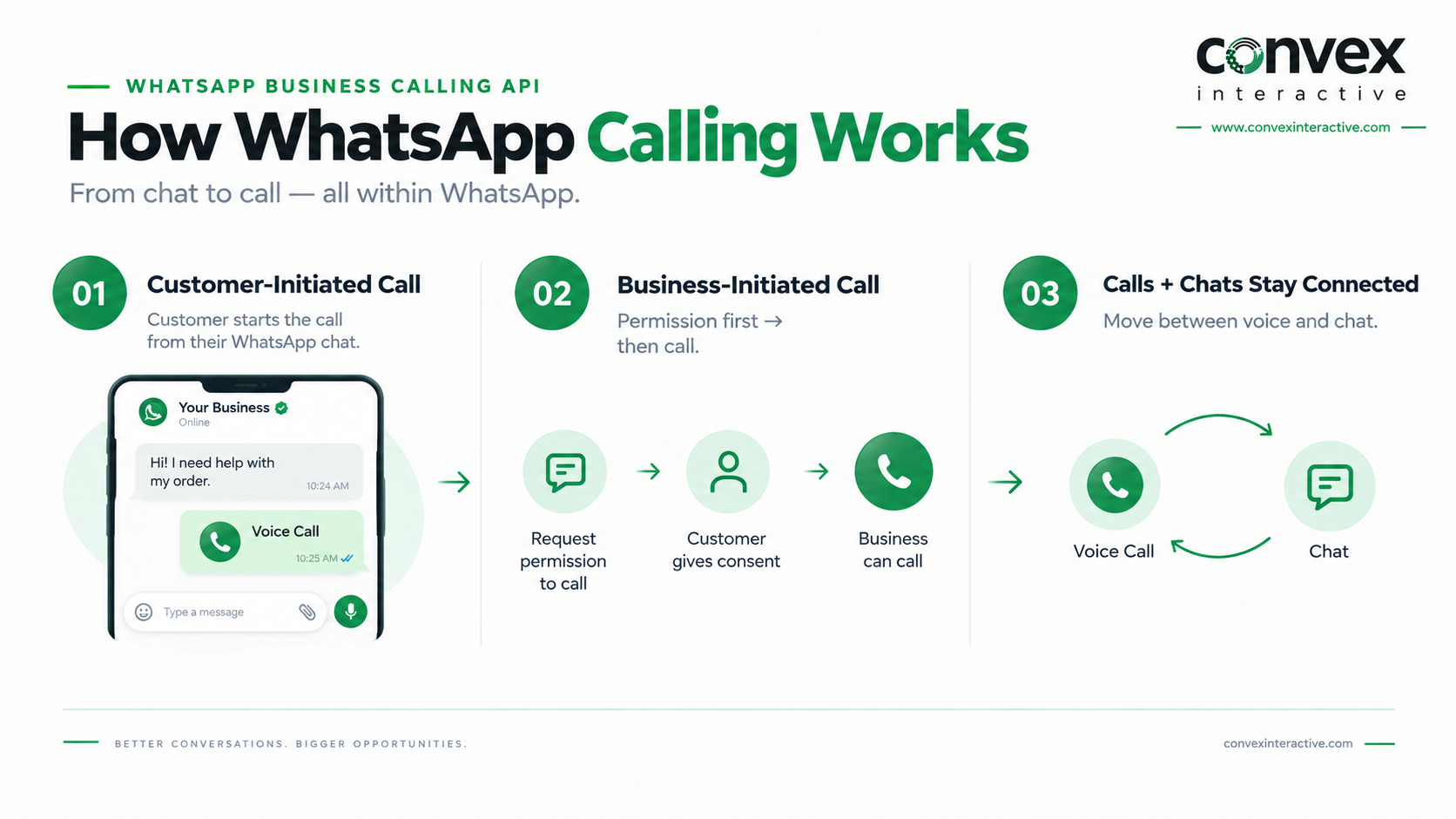
The WhatsApp Business Calling API brings voice calls into the same WhatsApp experience businesses already use for customer messaging, making it easier to switch between text and voice when a conversation needs more attention.
With the CRM integration, teams can keep customer details, conversations, and follow-ups organized in one place. Calls can be routed as follows:
1. Customer-Initiated Calls
Customers can start a voice call from their conversation with a business using the available calling options, offering a faster way to get help when explaining an issue via messages becomes difficult. Because the customer initiates the call, the business doesn’t need to request separate permission before the conversation begins.
2. Business-Initiated Calls
A business can also call a customer on WhatsApp, but the customer must first give explicit permission to receive business-initiated calls. This additional consent helps businesses keep outbound calls relevant and prevents customers from receiving unexpected calls from brands they engage with.
3. Calls and Chats Stay Connected
WhatsApp Business Calling links voice calls to customer chats, allowing agents to switch from messages to calls for complex issues. Afterward, businesses can continue the chat on WhatsApp without repeating information or switching channels.
Key Features You Get With WhatsApp Business Calling API
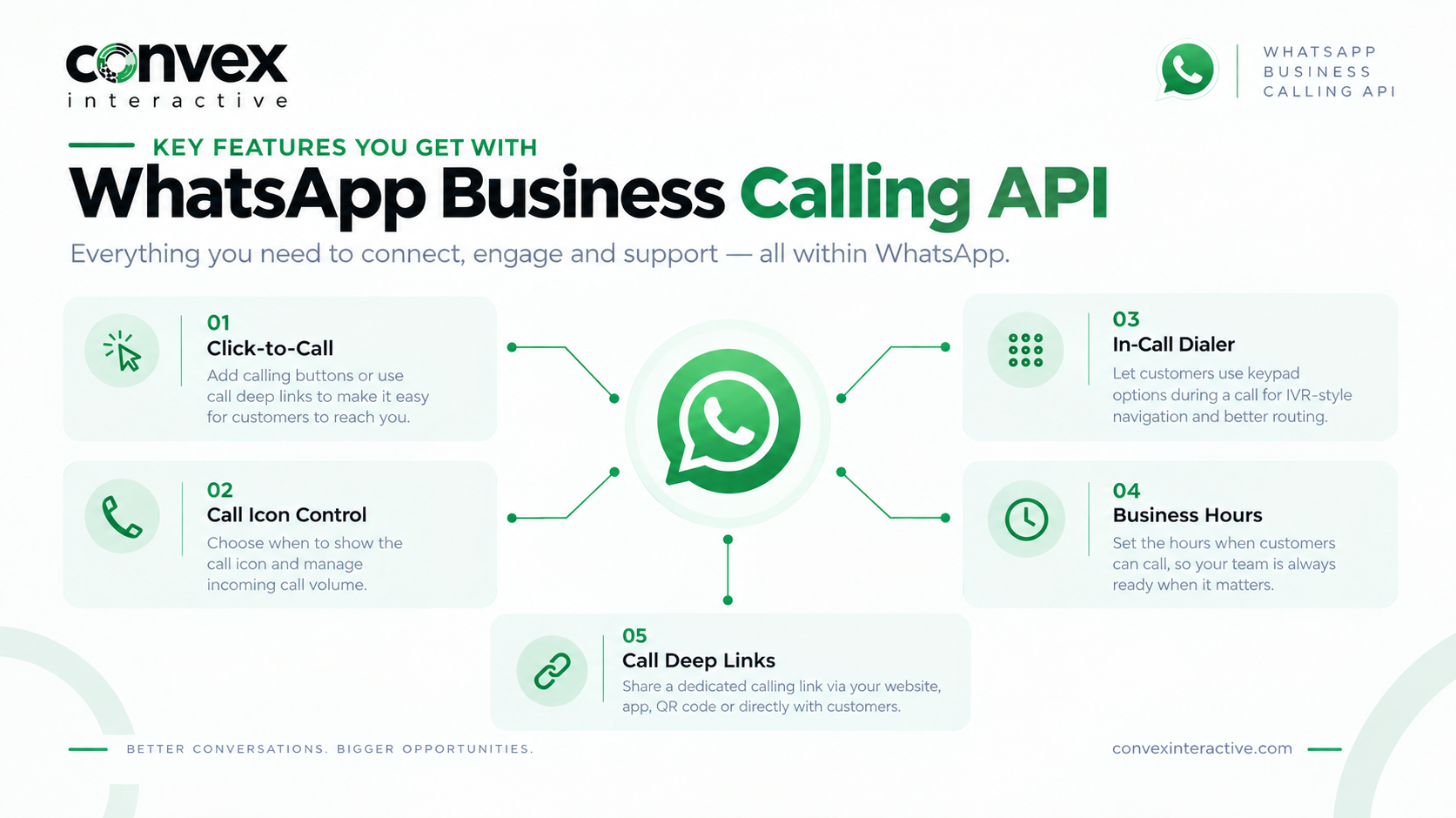
- Click-to-call: Businesses can add calling buttons to eligible WhatsApp messages, making it easy for customers to start a voice call when they need help beyond text. Meta also supports call deep links that businesses can place on websites, apps, or QR codes.
- Call Icon Control: Businesses can choose whether the call icon is visible to customers, giving teams more control over incoming call volume and helping them manage voice support based on available resources.
- In-Call Dialer: The built-in dialer lets customers use keypad options during a call, enabling IVR-style navigation and routing callers to the right service or department.
- Business Hours: Businesses can set the hours when customers can call, helping prevent calls when agents are unavailable and setting clearer expectations for voice support.
- Call Deep Links: Businesses can share a dedicated calling link via their website, app, or QR code, or send it directly to customers, offering another simple way to start a WhatsApp call.
WhatsApp Business Calling API Availability by Country
- Customer-Initiated Calling: Customers can initiate calls to businesses via WhatsApp where the Calling API is supported, providing a direct voice option when messaging is insufficient and allowing businesses to accept, reject, or end calls within WhatsApp.
- Business-Initiated Calling: Businesses can also initiate calls. Still, they must first request permission from the customer through WhatsApp, so outbound calling remains permission-based rather than functioning like unrestricted cold calling.
- Market Availability: Calling availability varies by business setup, country, and call type. Businesses should consult Meta’s current developer documentation and their provider before planning a customer journey that includes the feature.
How Customers Benefit From the WhatsApp Business Calling API
Here are the key benefits customers can enjoy with the WhatsApp Business Calling API:
1. More Convenience
Customers can switch from messages to a voice call when typing feels too slow, too complicated, or inappropriate for the situation. Everything stays within WhatsApp, so you don’t need to search for another number, open another app, or repeat the same details to a different support team.
2. Faster Problem Resolution
When a customer faces a technical issue or needs an urgent answer, a quick phone call can often resolve the problem more quickly than a long message exchange. Instead of waiting for replies or searching through help pages, customers can speak directly with an agent to explain and resolve the issue immediately.
3. More Personal Support
For important purchases or complex questions, customers often feel more comfortable speaking directly with a real person who can listen and address their specific situation. As a result, voice conversations help build trust more naturally and reassure customers before they decide.
4. One Place for Every Conversation
Customers no longer need to switch between WhatsApp chats, phone numbers, and separate support channels when a conversation needs to be transferred to a call. Keeping messages and calls in the same thread simplifies ongoing conversations by avoiding restarts or repetition.
5. Better Overall Customer Experience
Offering customers the choice between messaging and calling lets them use the option that suits their situation, rather than forcing everyone to use a single communication method. This flexibility can make support feel more responsive and convenient, enhancing the broader benefits businesses can deliver via the WhatsApp API.
How the WhatsApp Business Calling API Can Be Used
1. Customer Support
Some customer issues are difficult to resolve via messages alone, especially when they require quick clarification or personal assistance. The API lets customers move from chat to voice without leaving WhatsApp, helping agents resolve complex issues while keeping the conversation history in one place.
2. Lead Generation and Nurturing
When a potential customer needs more reassurance before deciding, a voice conversation can add the personal touch that messages sometimes cannot. Businesses can nurture leads on WhatsApp and offer a call when customers require detailed answers, helping move interested prospects closer to conversion.
3. Sales and Product Consultations
Customers often have questions about products, pricing, or available options that are easier to explain on a call than over several rounds of messages. Sales teams can start with a WhatsApp chat and move to a voice call when customers need recommendations, clarification, or help making their final decision.
4. Order Confirmation and Delivery Updates
Orders sometimes require more than an automated confirmation, especially when customers need help with delivery details, changes, or last-minute queries. Businesses can combine WhatsApp messages with voice calls to share important updates and provide customers with a faster way to resolve issues when texting isn’t convenient.
5. Appointment and Booking Assistance
Booking a service can be complex when customers have special needs, need clarification, or want to modify an appointment. Businesses can handle initial contacts via WhatsApp and use calls for direct assistance, providing a seamless experience without switching channels.
6. Post-Purchase Support
Customer support often extends beyond the purchase, whether for product help, updates, or personal issues. WhatsApp calling offers businesses another way to manage these conversations, keeping messages and calls connected and making follow-up support more convenient.
FAQs
Do businesses need permission to call customers on WhatsApp?
Yes, businesses need separate permission to make outbound WhatsApp calls, whereas customers can initiate calls to a business on WhatsApp.
Are video calls supported on WhatsApp Business Calling API?
No, general video calls are not fully supported yet, though Meta has started rolling out video calling and screen sharing in beta for select users.
Can WhatsApp Business calls connect to a regular phone number?
No, WhatsApp calls cannot connect to a traditional PSTN connection or non-WhatsApp phone number.
Is call recording supported by the WhatsApp Business Calling API?
Yes, the WhatsApp Business Cloud API’s Calling API supports call recording.
Reference:
https://whatsappbusiness.com/blog/whatsapp-business-calling-api/