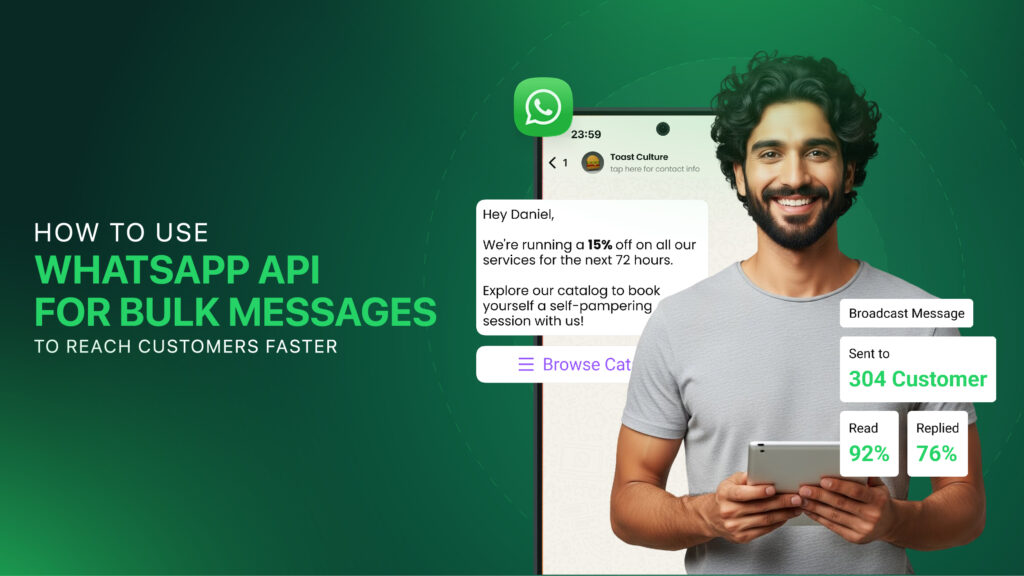
How to Use WhatsApp API for Bulk Messages to Reach Customers Faster?
WhatsApp has made communication faster, simpler, and more convenient, allowing people to connect, share updates, and stay in touch from almost anywhere. It is a powerful messaging platform designed for medium- to large-sized businesses that need to deliver personalized communication to customers at scale.
With over 3 billion users worldwide, WhatsApp offers businesses an unmatched channel to reach their audience. From sharing updates to answering customer questions in real time, it helps companies build stronger, more personal relationships with the people they serve.
But imagine a business with hundreds or even thousands of customers, all needing the same update. Individual chats, groups, and broadcasts each have their place, but none scale well when you’re trying to reach a large audience efficiently, which is exactly where bulk messaging becomes a practical choice.
Bulk messages may seem like the easiest option, but sending each message while keeping communication personal can quickly become time-consuming and challenging.
As the customer list grows, managing bulk messages becomes more challenging, especially when businesses need to organize conversations, keep customer details in one place, and maintain smooth interactions across touchpoints and channels.
This is where the WhatsApp bulk message API can make a real difference by helping businesses send automated, personalized messages at scale. It also supports public communication by making it easier to share important updates with a wider audience in a more organized way.
So, how does this approach actually work, and what makes it useful for modern businesses? Let’s explore the blog of WhatsApp API for bulk messages, its key benefits, and how it can help businesses create faster, more meaningful customer communication.
What is Whatsapp Api Bulk Messages for Business?
WhatsApp Business API bulk messaging is Meta’s official way to send a single message or a personalized campaign to thousands of customers at once.
Unlike the standard, free WhatsApp Business Mobile App, which limits broadcast lists to 256 contacts who must have your number saved, the API enables large-scale, automated communication without requiring recipients to save your business number.
For businesses, the benefits of the WhatsApp Business API include faster outreach, automated communication, personalized campaigns, and improved customer engagement. It makes large-scale messaging more efficient and helps brands maintain consistent, meaningful communication with their audience.
3 Methods to Send Bulk WhatsApp Messages
Not all Whatsapp Api bulk messages methods work the same way. Here’s a quick overview of the key options to help you choose the one that fits your business best.
1. Manual Broadcast Lists (WhatsApp Business App)
WhatsApp Business lets you send the same message to multiple customers via broadcast lists, with up to 256 contacts per list. It is a simple, free, and convenient option for small businesses that want to reach customers directly from their phones.
The main limitation is that recipients must have your number saved in their contacts to receive the broadcast. Features such as analytics, scheduling, automation, audience segmentation, and detailed campaign tracking are not available.
For businesses with a small customer base, broadcast lists can be useful for basic promotions and updates, but larger campaigns will quickly require a WhatsApp bulk message API for sending bulk messages to achieve greater reach, automation, scalability, and more effective campaign management.
2. Unofficial Third-Party Bulk Messaging Tools
Unofficial bulk messaging tools include browser extensions, desktop software, and modified WhatsApp apps that automate sending messages at scale from regular accounts. These tools often work by connecting via WhatsApp Web, using QR code sessions, or simulating clicks to send messages faster than normal.
However, these tools can create serious problems because they may bypass WhatsApp’s intended messaging limits and send messages to contacts who have not saved your number. This can trigger spam detection, increase the chances of restrictions or permanent account bans, and put your business communication at risk.
Moreover, Unverified software can expose private chats, contacts, and account info, providing little support if issues arise. For reliable business communication, using an official WhatsApp bulk message API is safer and more scalable.
3. Official WhatsApp Business API via Approved Providers
The WhatsApp Business API is designed for medium and large businesses that want to integrate WhatsApp with their existing CRM, marketing, and customer service systems for centralized communication.
In addition, the WhatsApp API for sending bulk messages enables businesses to deliver approved promotions, reminders, alerts, and updates to opted-in customers via structured messaging campaigns.
Most importantly, businesses can scale, automate, and grow with the AI-Powered WhatsApp Business API by using intelligent workflows and customer data to create more relevant, timely, and personalized conversations.
Key advantages include:
- CRM connectivity: Sync customer information with existing business systems.
- Smart workflows: Trigger messages based on customer actions or events.
- Personalization: Tailor communication using relevant customer details.
- Team collaboration: Allow multiple agents to handle conversations efficiently.
- Performance insights: Measure campaign results and customer engagement.
Why WhatsApp Business API Is the Secure Choice for Businesses
1. End-to-End Encryption
The WhatsApp Business API employs WhatsApp’s encryption, along with industry-standard HTTPS and TLS protocols and secure infrastructure, to safeguard customer message content during transmission between users, businesses, and connected systems.
Additionally, secure API connections and authentication help businesses protect communication when integrating WhatsApp with CRMs, automation platforms, and other business software.
2. Brand Authenticity & Customer Trust
The official API supports authentic business communication through verified business identities, customer opt-ins, and approved message templates, helping reduce spam, impersonation, and unwanted messages.
Furthermore, these requirements create a more transparent messaging experience, allowing customers to recognize legitimate business communication and interact with greater confidence when sending bulk messages.
3. Enterprise Compliance
The WhatsApp Business API provides businesses with a structured environment for managing customer communication while following Meta’s messaging, privacy, and data-handling requirements.
Moreover, secure integrations, controlled access, and connectivity help organizations maintain better oversight of customer information and communication workflows.
4. Account & Messaging Protection
Unlike unofficial automation tools, the official API operates through Meta’s approved infrastructure and adheres to established messaging policies, reducing the risks associated with unauthorized bulk messaging.
In addition, maintaining customer opt-ins, using approved templates, and following quality guidelines helps businesses protect their sender reputation and maintain reliable messaging capabilities.
5. Secure Data Transmission
The official API uses secure communication channels to transfer messages between WhatsApp and connected business platforms, helping protect information throughout the messaging process.
At the same time, businesses should secure their own systems, API credentials, and integrations to ensure that customer information remains protected throughout the communication workflow.
Step-by-Step Guide to Sending Bulk WhatsApp Messages with Convex Interactive
Step 1: Create Your Account
Because Meta requires businesses to use its WhatsApp Business API, you’ll need to sign up with a top-notch WhatsApp Business API provider, such as Convex Interactive’s WhatsApp Business API Services. To begin setup, you’ll need to provide your Meta Business portfolio, WABA, and a dedicated business phone number.
Once your account is created, prepare your business information for the verification process and ensure your details are accurate, as this provides the foundation you need to connect your WhatsApp Business Account.
Step 2: Complete Meta Business Verification
Submit your required business information and official documents via Meta Business Verification to verify your company’s identity and establish your business as an authentic organization before you begin sending WhatsApp messages at scale using the official API.
Once the verification process is complete, connect your WhatsApp Business Account (WABA) to the Convex platform so your verified business can access the required messaging features, manage campaigns, and prepare its WhatsApp communication for the next stages of setup.
Step 3: Create & Approve Message Templates
Create message templates for promotions, notifications, reminders, updates, and other customer communications you plan to send, and add personalization fields, media, or call-to-action buttons where appropriate.
Submit your templates to Meta for review and wait for approval before using them for bulk outreach. Approved templates help ensure your campaigns comply with WhatsApp’s messaging requirements and deliver relevant communication to customers.
Step 4: Upload & Segment Contacts
Import your customer list via a CSV file or connect your CRM to bring in existing customer information for your messaging workflow. Ensure every recipient has provided the appropriate consent to receive WhatsApp messages from your business.
Organize your contacts into meaningful segments based on customer behavior, interests, location, purchase history, or campaign goals. Targeted segmentation lets you send more relevant messages rather than delivering the same campaign to everyone.
Step 5: Launch Your Bulk Campaign
Select your approved template, choose the appropriate audience segment, personalize the available fields, and schedule or launch your campaign through the dashboard, which provides a centralized way to manage your WhatsApp outreach.
Using the official WhatsApp API helps businesses streamline campaign delivery without relying on manual sending or unauthorized automation tools. You can therefore manage larger campaigns more efficiently while maintaining an organized messaging workflow.
Step 6: Track & Optimize Campaign Results
After launching your campaign, review performance metrics such as delivery rates, read rates, clicks, and customer responses to understand how recipients engage with your messages and to evaluate each campaign’s effectiveness for WhatsApp API bulk messages.
Use the results to improve future templates, refine audience segments, and adjust your messaging strategy based on customer engagement. Over time, consistent analysis can help you create more relevant campaigns and improve overall WhatsApp marketing performance.
Best Practices to Maximize WhatsApp Bulk Marketing Results
Sending bulk WhatsApp messages is easy, but sending them effectively requires relevance, timing, and personalization. Follow these best practices to improve engagement, build trust, and get better results from every campaign.
1. Build Permission Before You Message
Start every campaign with clear customer consent, ensuring people understand the type of WhatsApp communication they are agreeing to receive and how often they can expect it. Maintaining proper opt-in records supports compliant WhatsApp for companies and helps businesses build a more trusted and sustainable relationship with their audience.
2. Make Every Message Relevant
Use customer details such as names, previous purchases, interests, or recent activity to make your communication useful instead of sending the same generic message to everyone. This approach works especially well for WhatsApp Business API use cases, including personalized offers, reminders, updates, and customer support.
3. Choose the Right Moment to Send
Schedule campaigns according to your audience’s location, behavior, and communication preferences, rather than sending every message at the same time. For WhatsApp Business API for E-Commerce, timely order updates, delivery alerts, cart reminders, and promotions can improve the overall customer experience.
4. Deliver Value, Not Just Promotions
Give customers a clear reason to engage by focusing on useful information, relevant offers, important updates, or helpful assistance instead of constant promotional messages. When considering WhatsApp Business API or App: What’s the best for your brand?, the API offers greater control for automation, integrations, and structured campaigns.
5. Segment Customers for Better Results
Divide your audience by purchase history, interests, location, engagement, or customer stage so that every campaign reaches people more likely to find it relevant. Effective segmentation can support targeted campaigns for new customers, repeat buyers, abandoned carts, and post-purchase engagement.
6. Make Opt-Outs Simple and Immediate
Provide customers with a clear and easy opt-out option and honor their requests promptly to prevent unwanted communication and maintain a healthy messaging relationship.
A simple unsubscribe process supports responsible messaging while protecting customer trust, message quality, and compliance.
Common Mistakes to Avoid
Even with the right WhatsApp Business API for sending bulk messages, common messaging mistakes can reduce engagement, affect customer trust, and hurt your campaign performance.
Here are some common mistakes to avoid when using the WhatsApp API for bulk messages:
1. Using Unofficial Bulk Messaging Tools
- Account Risk: Unofficial WhatsApp bulk senders can trigger restrictions or permanent suspension of your business number.
- Security Concerns: Modified apps and browser automation may expose customer information, conversations, and business data.
- Better Approach: Use the official WhatsApp Business API with trusted integrations to enable secure, scalable messaging.
2. Sending Messages Without Customer Consent
- No Purchased Lists: Avoid sending campaigns to purchased or scraped phone numbers that have not agreed to receive your messages.
- Get Opt-In: Collect clear customer consent before adding contacts to your WhatsApp marketing campaigns.
- Stay Compliant: Maintain consent records to support responsible messaging and reduce spam complaints.
3. Ignoring Message Template Guidelines
- Follow Requirements: Create templates that follow WhatsApp’s messaging policies and clearly match their intended purpose.
- Provide Value: Avoid misleading claims or excessive promotional language that can render templates ineffective or lead to rejection.
- Improve Quality: Use clear, useful, and relevant templates to create a better experience for your customers.
4. Over-Messaging Your Customers
- Avoid Message Fatigue: Sending too many campaigns can increase blocks, spam reports, and customer dissatisfaction.
- Control Frequency: Create a sensible messaging schedule based on customer preferences and campaign objectives.
- Prioritize Relevance: Send timely, valuable content rather than repeatedly promoting the same products or offers.
5. Sending the Same Message to Everyone
- Segment Contacts: Divide customers according to interests, location, purchase history, engagement, or behavior.
- Personalize Campaigns: Adapt your content to different customer groups so each message feels relevant to its audience.
- Improve Engagement: Targeted campaigns can generate stronger responses while reducing the number of ignored messages and negative feedback.
6. Neglecting Campaign Analytics
- Track Performance: Monitor delivery, read rates, clicks, responses, and other available campaign metrics.
- Identify Problems: Use performance data to discover weak messages, poor targeting, or declining customer engagement.
- Optimize Continuously: Apply these insights to improve future campaigns and build a more effective WhatsApp bulk messaging strategy.
FAQs
How does WhatsApp API for sending bulk messages work?
The WhatsApp API for sending bulk messages helps businesses deliver approved messages to opted-in customers at scale while enabling automation, personalization, and CRM integration for efficient campaign management.
How many messages can I send through WhatsApp API?
The number of messages you can send depends on your Meta messaging limits, account quality, and business activity, with higher capacity becoming available as your account maintains strong messaging quality.
What is a sender in WhatsApp API?
A sender is the verified business phone number used to send and receive WhatsApp messages through the API, representing your business across customer conversations and messaging campaigns.
Can WhatsApp API automate bulk messages?
Yes, WhatsApp API can automatically send messages based on customer actions, purchases, reminders, or scheduled campaigns, reducing manual work and making recurring communication easier to manage.
Why use WhatsApp API instead of manual bulk messaging?
WhatsApp API offers greater scalability, automation, CRM integration, personalization, and campaign control, making it a more effective solution for businesses handling high volumes of customer messages.