
Five Mysteries Whatsapp Includes, just power clients think about.
WhatsApp, the world’s most famous messaging app has been making updates time to time which has improved it’s interface and has made it more user friendly.
While the messaging app now has a number of new features such as video call and Giff support, there are other not so obvious ones that users may not be aware of.
Below is the list of 5 latest WhatsApp features that you may not know about Have a look as they might be useful for you!
1. Reply to a specific message in a group chat
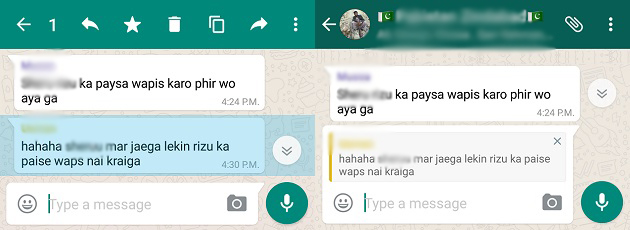
This new hidden feature now allows users to reply to a particular message in a conversation. All you need to do is simply tap and hold on to a particular line of the text, for Android users you then have to hit the backward arrow button that appears on top and for iPhone users you just have to tap on the ‘reply’ option which pops up. Doing this allows the user to directly reply to the particular message they want to answer to.
2. Find out who has read your message in group chats
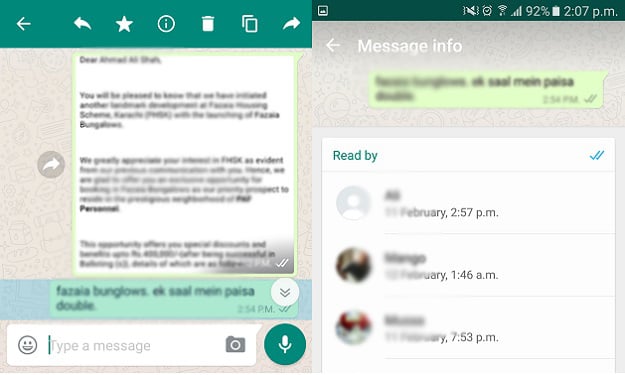
Knowing if your message has been seen or read in WhatsApp group chats is not as obvious as it is in one on one chats. However, it is very simple to figure this out. What you have to do is press and hold the message you have sent, Android users then have to hit the ‘i’ button on the top and as for iPhone users they just have to swipe right. The app will then show all the people from the group who have seen or read that particular message.
3. Listen to voice messages discreetly
Many users use WhatsApp primarily for it’s voice messages feature. However, a problem with this feature is that the default setting makes the voice messages play on the speakerphone which can be a problem when you’re in the vicinity of others. But WhatsApp now has a solution to this problem, you can now listen to a voice message discretely, simply play the voice message and put the phone next to your ear, this would automatically play the message on the earpiece.
4. Direct a message to a particular user in a group
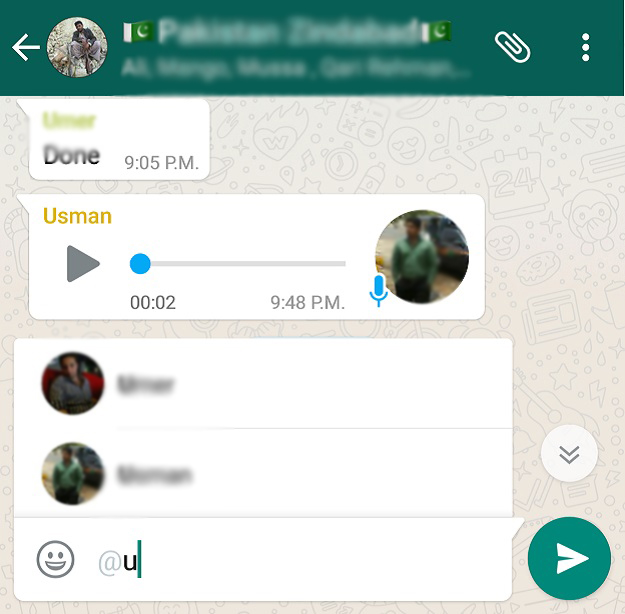
Now you can alert a particular member in a chat group, by simply adding a @ sign followed by the users name. This would notify the user in a group that his or her name has been mentioned in the conversation.
5. Manipulate texts to make them prominent

The feature mentioned has been around for a while now, but most WhatsApp users still don’t know about it. With this option you can now add emphasis to words in a message by applying different symbols before and after it. Using an asterisk ( * ) would make the word appear in bold, adding underscores ( _ ) would make the text appear italicized and you can also strike off a word by using the tilde ( ~ ) symbol.